A CI/CD pipeline is an automated workflow that continuously integrates code changes, runs tests, and deploys applications to production, enabling development teams to deliver software faster and more reliably.
By the end, you’ll understand why top engineering teams ship code dozens of times a day — and how you can do the same.

What Is a CI/CD Pipeline? A Plain English Explanation
A CI/CD pipeline is an automated workflow that takes your code from a developer’s laptop to a live production server — without manual steps in between. CI stands for Continuous Integration. CD stands for Continuous Delivery (or Continuous Deployment). Together, they form a system that tests, builds, and ships your code on its own. Consequently, every time someone pushes a change, the pipeline handles the rest.
Next, Think of it this way — before CI/CD, deploying software was like baking a cake by hand for every single customer. It was slow, error-prone, and exhausting. In contrast, a CI/CD pipeline is like a fully automated bakery. You add ingredients (code), and the machine handles everything else — mixing, baking, packaging, and delivery. As a result, the product lands on the customer’s plate every time, fast and consistent.
In other words, a CI/CD pipeline removes the human bottleneck from software delivery. It’s not just a nice-to-have — it’s a core skill every DevOps engineer needs in 2026.
Key Concept: CI/CD pipeline = automated code testing + building + deployment. Every push triggers the pipeline. If tests pass, the code ships. If they fail, the pipeline stops and alerts the team.
CI vs CD: What’s the Difference?
These two terms are closely related. However, they’re not the same thing. Here’s a clear breakdown.
Continuous Integration (CI) is about merging code frequently and testing it on its own. Thus, specifically, every time a developer pushes code, the pipeline runs automated tests to check that nothing is broken. Since teams push code multiple times a day, CI catches bugs early — before they pile up into a major problem.
Continuous Delivery (CD) takes things further. After CI passes, CD on its own prepares the code for release. Generally, the app is packaged, staged, and ready to deploy to production with a single click — or even on its own, if your team uses Continuous Deployment.
Continuous Delivery vs Continuous Deployment
Although these terms sound alike, there’s a key difference. Continuous Delivery means the release is ready but a human approves it before going live. Continuous Deployment means the release ships to production on its own without any manual approval. Most teams start with Continuous Delivery for safety, then move to full Continuous Deployment once they trust their test coverage.
The 5 Stages of a CI/CD Pipeline Explained
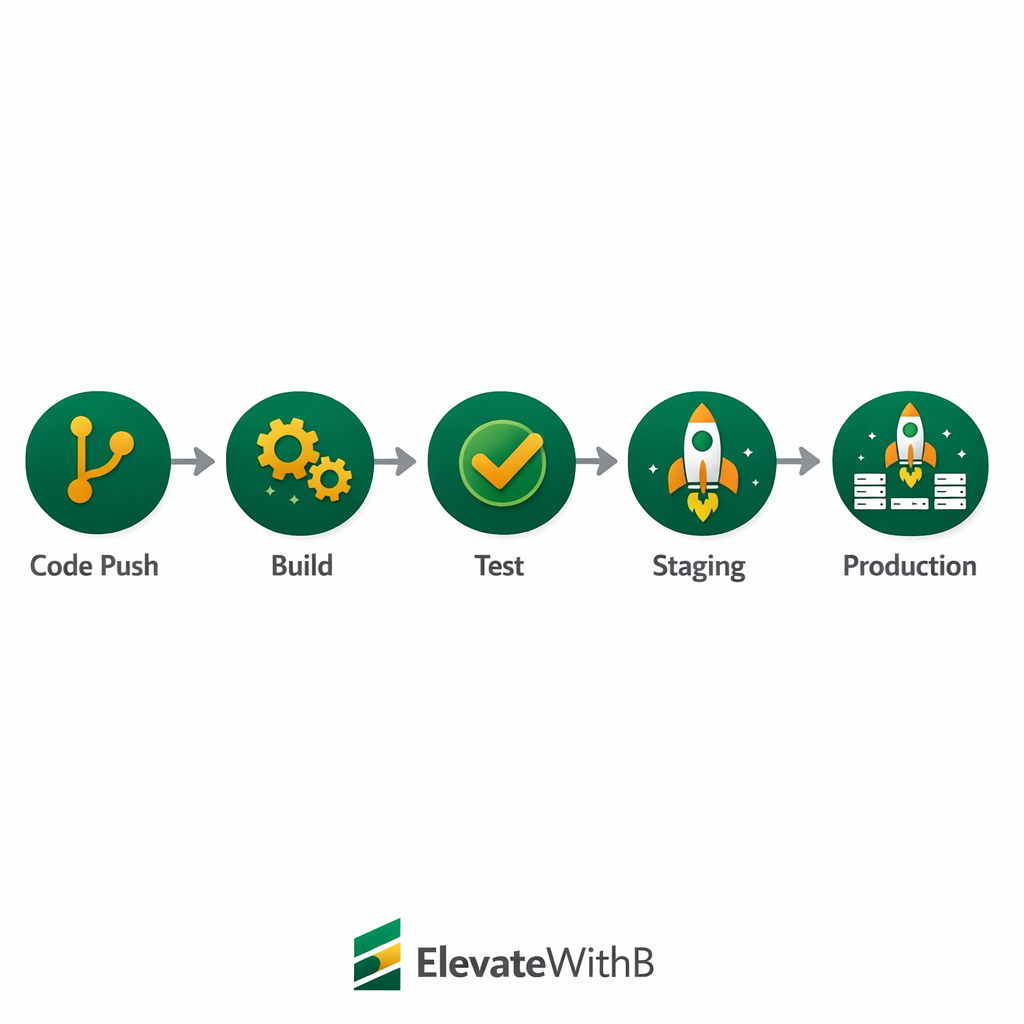
Every CI/CD pipeline follows a similar flow, regardless of which tools you use. Plus, Understanding these stages is the foundation of DevOps automation.
1
Source (Code Push)
A developer pushes code to a Git repository (GitHub, GitLab, Bitbucket). This event triggers the pipeline on its own. No manual start needed.
2
Build
Then, The pipeline compiles or packages the code. For a Node.js app, this means running npm install and npm build. The build stage confirms the code can actually run.
3
Test
Automated tests run. Hence, Unit tests, integration tests, and security scans check that nothing is broken. If any test fails, the pipeline stops and notifies the team.
4
Deploy to Staging
The tested build deploys to a staging environment — a copy of production. QA teams verify the app behaves as expected in a realistic setup.
5
Deploy to Production
Basically, after staging passes, the app goes live. With Continuous Delivery, a human approves this step. With Continuous Deployment, it ships on its own.

Popular CI/CD Pipeline Tools in 2026
You don’t need expensive software to run a CI/CD pipeline. In fact, several excellent tools are free for individuals and small teams.
GitHub Actions
Of course, GitHub Actions is the most beginner-friendly CI/CD tool available today. It’s built directly into GitHub. As a result, if your code is already on GitHub, you don’t need to set up anything extra. You write a YAML file in your repo, define the steps, and GitHub runs your pipeline on every push. It’s free for public repos and generous on private ones. Indeed, since most IT students already use GitHub, this is the best starting point.
GitLab CI/CD
GitLab has a powerful built-in CI/CD system. You add a .gitlab-ci.Also, yml file to your project, define stages, and GitLab handles the rest. It’s also free for personal use. Additionally, GitLab offers a built-in container registry and deployment tools, making it an all-in-one option for teams.
Jenkins
Jenkins is an open-source CI/CD tool that’s been running since 2011. Furthermore, it’s highly customizable and supports thousands of plugins. However, it requires more setup than GitHub Actions or GitLab. Jenkins runs on your own server, which gives you full control — although that also means you manage the systems. It’s still widely used in enterprise environments in 2026.
Beginner Tip: Start with GitHub Actions. It’s free, fully integrated, and requires zero extra setup. Once you understand the basics, exploring Jenkins or GitLab CI becomes much easier.
Build Your First CI/CD Pipeline with GitHub Actions
Here’s a simple GitHub Actions workflow that runs tests on every push. Even if you’ve never written a pipeline before, you’ll understand every line.
.github/workflows/ci.yml — Your First Pipeline
name: CI Pipeline

on:
  push:
    branches: [ main ]
  pull_request:
    branches: [ main ]

jobs:
  build-and-test:
    runs-on: ubuntu-latest
    steps:
      - name: Checkout code
        uses: actions/checkout@v4
      - name: Set up Node.Yet, js
        uses: actions/setup-node@v4
        with:
          node-version: '20'
      - name: Install dependencies
        run: npm install
      - name: Run tests
        run: npm test
Here’s what happens when you push code. The pipeline triggers on a push to main. It spins up an Ubuntu machine, checks out your code, installs Node.js, installs your packages, and runs your tests. Clearly, If tests pass, the job succeeds. If they fail, GitHub sends you a notification. The whole process takes about 60 seconds.
Common Mistake: Never hardcode passwords or API keys in your pipeline YAML file. Use GitHub Secrets instead — store sensitive values there and reference them as variables. Your YAML file is visible to everyone with repo access.
4 CI/CD Pipeline Mistakes Beginners Make
Once you start building your CI/CD pipeline, watch out for these mistakes. They’re all avoidable once you know what to look for.
X
No Tests at All
A pipeline without tests just automates deployments blindly. Always include at least basic unit tests. Indeed, Even a few tests are better than none — they catch the most common regressions.
X
Secrets in YAML Files
Hardcoding API keys or passwords in your workflow file is a serious security flaw. Use environment variables or secrets management tools instead.
X
Deploying Directly to Production
Still, Skipping a staging environment means bugs reach real users. Always deploy to staging first, verify it works, then push to production. This two-step approach saves a lot of pain.
X
Ignoring Failed Builds
When a pipeline fails, fix it immediately. Next, A broken pipeline that people ignore is worse than no pipeline. Treat failed builds as a top priority — don’t merge more code on top of a broken build.
Why CI/CD Pipeline Skills Matter for Your DevOps Career?
Every DevOps job listing in 2026 mentions CI/CD as a required skill. It’s not optional anymore — it’s the baseline. Thus, When you understand how a CI/CD pipeline works end to end, you can contribute to engineering teams from day one. You don’t need years of experience. You need working knowledge of the tools and the concepts.
After mastering CI/CD basics, the next step is combining it with systems as Code tools like Terraform. Similarly, adding Docker and Kubernetes to your pipeline skills makes your profile extremely strong for cloud and platform engineering roles. Start small, build real pipelines on GitHub, and document them in your portfolio. Generally, Employers value hands-on evidence far more than certifications alone.
Frequently Asked Questions
What is the difference between Continuous Integration and Continuous Delivery?
Continuous Integration (CI) automatically builds and tests code every time a developer pushes changes to the repository. Continuous Delivery (CD) takes it further by automatically deploying that tested code to staging or production environments, making the entire release process seamless.
What are the main stages of a CI/CD pipeline?
A typical CI/CD pipeline has four stages: source (code commit), build (compile and package), test (automated unit, integration, and security tests), and deploy (release to staging or production). Some pipelines also include a monitoring stage after deployment.
Which CI/CD tool should a beginner start with?
GitHub Actions is the best starting point for beginners because it is free for public repositories, integrates directly with GitHub, and uses simple YAML configuration files. Jenkins is another popular option if you need more customization and self-hosted control.
Do I need to learn CI/CD for a DevOps career?
Yes, CI/CD is a core skill for any DevOps role. Nearly every DevOps job listing requires experience with pipeline automation, and understanding CI/CD principles is essential for certifications like AWS DevOps Engineer and the GitHub Actions certification.
Can I set up a CI/CD pipeline without coding experience?
You need basic familiarity with Git and YAML syntax, but you do not need to be an advanced programmer. Most CI/CD tools provide templates and visual editors that simplify pipeline creation for beginners.
Want to Build Real CI/CD Pipelines from Scratch?
Bhanu’s DevOps training covers GitHub Actions, Jenkins, Docker, Kubernetes, and full CI/CD automation — all with hands-on projects you can add straight to your resume. Join the online program and start building today.